
Download PlayTo APK – cast to TV, stream to smart TV, media casting app, Android casting tool, play to device, free media player, cast from phone
Overview
PlayTo is a media casting application designed for Android devices, enabling users to stream content from their smartphones or tablets to a variety of smart displays. The app serves as a bridge between personal mobile media and compatible casting devices such as Chromecast, Amazon Fire TV, Apple TV, Roku, and other DLNA-enabled players. It supports over 150 websites and media servers, allowing users to access and cast videos, music, and photos directly from their device to a larger screen. The core purpose of PlayTo is to simplify the process of content sharing across devices, particularly for users who frequently watch online media or share personal files with family or friends.
Target users include casual consumers and digital media enthusiasts who value convenience and seamless integration between mobile and home entertainment systems. The app is especially useful in home settings where multiple devices are used for media consumption. It enables users to enjoy content on a bigger screen without the need for complex setup or proprietary apps. PlayTo does not host any video content itself, meaning it relies entirely on external sources, which ensures compliance with copyright policies. The developer did not provide additional information about the company or its background beyond the app name.
Key Features & Capabilities
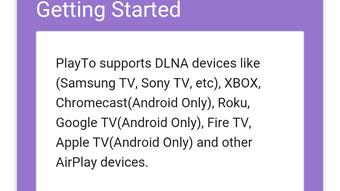
- Universal Media Casting – PlayTo supports casting to a wide range of devices including Chromecast, Amazon Fire TV, Apple TV, Xbox, Roku, Samsung Smart TVs, Sony Smart TVs, and other DLNA-compatible players. This broad compatibility allows users to connect with most modern entertainment systems without restrictions.
- Unified Search Across Media Servers – A standout feature is the ability to search across multiple media servers simultaneously. This eliminates the need to switch between different apps or services, streamlining the discovery process for videos, music, and photos.
- Content from Social Platforms – Users can stream media directly from their Facebook wall, enabling easy sharing of videos and images with others via casting. This feature enhances social interaction during group viewing sessions.
- Ad and Malware Blocking – PlayTo includes built-in protection that blocks ads and potential malware from websites during playback, improving both security and viewing experience.
- Video Ad Skipping – The app supports skipping video ads on supported websites, allowing users to enjoy uninterrupted playback without manual interruptions.
- One-Touch Casting via Direct Share – With Android 6.0’s Direct Share functionality, users can cast content with a single tap, significantly reducing steps and enhancing workflow efficiency.
- Support for Over 150 Websites – The app integrates with a large number of online content providers, offering broad access to streaming sources.
These capabilities make PlayTo ideal for users seeking a centralized tool to manage media across devices. Whether watching a video from a news site, sharing vacation photos, or playing music from a playlist, the app offers a unified and accessible solution.
User Interface, Workflow & Performance
The user interface of PlayTo is designed with simplicity and efficiency in mind, focusing on intuitive navigation and minimalistic layout. Users can access their media libraries, browse supported websites, and initiate casting with minimal steps. The main screen displays available casting devices, recent content, and a search bar for quick access to media servers.
Workflow efficiency is enhanced by the Direct Share integration, which allows users to cast content directly from other apps without leaving their current context. This reduces friction in the casting process and supports a seamless user journey. The app’s performance is optimized for Android devices, though exact resource usage details were not specified.
Stability and responsiveness are expected to be consistent with standard Android applications, but the developer did not provide performance benchmarks or system behavior data. General software behavior patterns suggest smooth operation on devices meeting baseline Android requirements. No specific issues related to crashes or lag were reported in the available information.
Compatibility & System Requirements
PlayTo is designed exclusively for Android devices. The current version is 1.0.2, with a file size of 10.2 MB, indicating a lightweight footprint. The app is available for free download on the Google Play Store, making it accessible to a wide audience.
Compatibility information was partially provided. The app supports Android operating systems, but the minimum required version was not specified. The developer did not list exact hardware requirements or CPU/RAM usage thresholds. Users should ensure their device runs a modern Android version to maintain compatibility with casting features and third-party website integrations.
For optimal performance, users are advised to keep their device’s OS updated and ensure stable Wi-Fi connectivity when casting content. The developer did not specify whether offline functionality is available.
Pros and Cons
Pros
- Supports casting to over 150 devices and media servers
- Unified search across multiple media sources
- One-click casting via Android Direct Share
- Ad and malware blocking for enhanced security
- Video ad skipping on supported websites
- Free to download and use with optional premium features
- Lightweight at 10.2 MB
Cons
- Does not support Flash or FLV video formats
- No support for websites with copyrighted content
- Exact system requirements not provided
- May require a stable Wi-Fi connection for smooth streaming
- Offline mode functionality not confirmed
FAQ Section
Is PlayTo compatible with all smart TVs?
PlayTo supports a wide range of smart TVs including those from Samsung, Sony, and other brands that are DLNA-compatible. However, full compatibility depends on the specific model and its casting capabilities. The developer did not provide a comprehensive list of supported devices.
Is PlayTo safe to use?
PlayTo includes ad and malware blocking features, which contribute to a safer browsing and streaming experience. The app does not host any content itself and relies on external sources, reducing the risk of malicious files. However, users should exercise caution when accessing third-party websites.
Does PlayTo require an internet connection?
Yes, an active internet connection is required to stream content from websites or media servers. The app also needs a stable Wi-Fi network to maintain smooth casting performance.
Can I use PlayTo without a premium subscription?
Yes, PlayTo is available for free download. The basic version includes core casting features, while premium features such as unlimited streaming and an ad-free experience are available through in-app purchases.
Does PlayTo work offline?
There is no confirmed information about offline functionality. The app is primarily designed for online streaming, and the developer did not specify whether local files can be cast without an internet connection.
Final Thoughts + CTA
PlayTo delivers a powerful and user-friendly solution for streaming media from Android devices to smart TVs and other casting platforms. Its ability to unify content discovery across over 150 sources, combined with robust security features like ad blocking and video ad skipping, sets it apart from basic casting tools. The integration with Android’s Direct Share adds a layer of convenience that enhances daily usability.
While the app has limitations—such as no support for Flash or FLV files and restrictions on copyrighted content—it remains a solid choice for users seeking a free, secure, and efficient way to cast media. The lightweight design and broad device compatibility further strengthen its appeal.
For anyone looking to simplify their home entertainment setup, PlayTo offers a compelling mix of features and accessibility. Download PlayTo now and start casting your favorite content with ease.






.png)
